
New uBooks 2.4.2, iPhone e-book reader app that took a fancy to many of you is already released and ready for download!
Software Development Company
Whatever You Can Imagine
We Can Deliver
NIX Solutions is happy to present new application for Android mobile platform – uPackingList. This application is developed according to the demands and suggestions of the iPhone uPackingList users and includes a lot of helpful features.
The app is designed to make packing for any trip or journey more convenient and pleasant. It saves your time and energy for other activities. uPackingList was developed for you not to miss anything.
At least once in your life you have faced the situation you’d left something small but valuable at home and had to search for replacement. That can be o.k. if you are traveling twice a year for a vacation to the sea or mountains.
But what should you do if travelling is a part of your lifestyle? You can use uPackingList for Android mobile platform and organize the packing process in the most efficient way.
Start the app and choose to create the new packing list or to open the saved one.
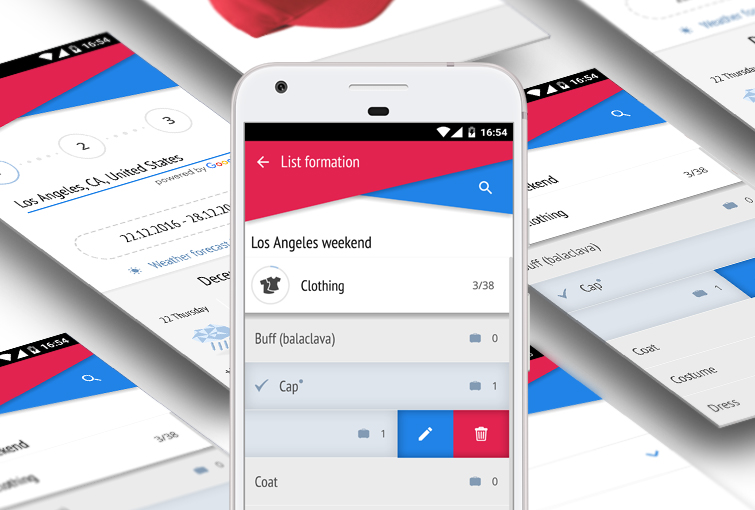
Add items to the list from the required category. All the items are carefully sorted out to the categories where you can easily find them. General settings will help you to set the main app options.

When the list is ready you can reach it any time and reuse as many times as you need. To mark the item as packed you need just one tap. The packing progress is displayed in percents and the number of packed items for each category. Category Preparations is specially made to check whether all the necessary tasks are completed.

You can download uPackingList Android free using QR code on this page.
File size: 1 MB
Interface language: English, Russian
Version: 0.91
Follow our Android development team and be the first one to find out the latest news and app’s updates on @NixS_idev.
Got any suggestions on functionality or design enhancement? Contact us or leave a reply below.
6:42 am
Hi,
Thanks for this awesome program. If you can slightly tweak it to pack in the next upgrade that’d be perfect. It’s the only thing missing to this awesome application. My problem is I purchased uPackingList for my iTouch & now have the program on my new Android as well. I tried sharing my catalogs & lists, but the Android (HTC Sensation) says there is no program to open the list. I tried it a few different times to make sure it wasn’t my inexperience with the new device, but it is a straightforward process. Is there a way of sharing between both platforms?
Thanks. Hope to hear from you soon.
6:17 pm
Hi Kennedy,
Yes, you are right that it’s very convenient to export/import lists between two competing platforms on your iTouch and HTC.
We are working on implementation of this feature and hope we’ll present it soon. Currently you can’t share catalogs and lists.
11:05 pm
Can the information be shared between android devices, like between a cell phone and a tablet (both running on android platform)?
11:39 am
Hello Amy,
You can import or export created Lists between different android devices via Bluetooth.
Go to Settings and choose Import/Export, then “via Bluetooth”.
If you have any further questions, please feel free to contact us again.
3:37 am
Even though I have the setting set for sort by A/Z when I add an additional item after I create the list it goes to the bottom of the lit.
Jeff
11:35 am
Hi Jeff,
Thank you for information. We will check this feature and fix it in the next update of the application.
8:11 pm
I have been using uPacking list on my iPad and iPhone for some time quite happily until this week. First, let me say that my setting are for updates or deletions to impact only the “current list”.
I have several lists into which I have invested hours and hours of labor – a generic camping list, which I then copy for specific trips and update.
I created a new list this week from one of the old ones and completely revamped it to use for helping to plan the space in a conversion van. To my dismay (and I double checked my setting before writing this note), all the existing lists were also updated and they now look exactly like the new one. I have to start over from scratch to recreate the old camping lists, because I still need those for another year. Now I’m now afriad to make any changes I’m really, really pissed off about it.
1:00 pm
Hello Leslie,
Thank you for letting us know.
What iOS version are you currently running on your device?
And what version of app are you using? free or paid?
We will try to understand what is wrong and hopefully the developers will sort it out as quickly as possible.
We will notify you of the results.
11:58 am
To my dismay (and I double checked my setting before writing this note), all the existing lists were also updated and they now look exactly like the new one.
11:40 am
Hello Sumon,
Thank you for letting us know.
We will try to understand what is wrong.
We need to know what device and the firmware version you are using.
4:57 pm
I have several lists into which I have invested hours and hours of labor – a generic camping list, which I then copy for specific trips and update.
6:11 pm
Hi,
will you provide a french version of this app ?
by the way, good job !
11:41 am
Hello Tommy,
Thank you for your interest in uPackingList app.
Currently there are no plans to add French language.
The app supports English and Russian interface languages.
3:15 am
Any news on when an android with the ability to export/import list will be released? either that or any method for saving all lists before hardware reset of phone ?
3:36 pm
We will consider such feature in next release.
Currently we are working on a new version. We’ll release it as soon as we finish its complete testing.
2:30 pm
Hi , congrats! I am so happy to hear that these recommendations will come come in handy for me. Also, thank you for bringing the such app to my attention, I haven’t used it before, but I’m very intrigued, and will likely add it to my list of travel apps as well! Happy travels!!
Salvatore Langmyer